
Batch Review & Approval: Maximise Efficiency Across High-Volume Creative Work
Marketing teams are producing more assets than ever before — social tiles, banners, email variations, product images, print layouts, video edits and more. Reviewing each asset individually slows teams down and creates bottlenecks in the marketing approval workflow.
Admation’s Batch Review & Approval feature solves this challenge by allowing teams to review, mark up and approve multiple assets at the same time. Whether you’re managing a multi-channel campaign or a high-volume retail rollout, Admation helps you deliver faster, reduce repetitive feedback loops and maintain consistency across every creative output.
For busy teams, batch approval becomes a strategic advantage — freeing up valuable time, improving accuracy and supporting efficient, compliant creative workflows.
What Problem Does the Batch Review & Approval Feature Solve?
Marketing and creative teams often manage large volumes of assets across multi-channel campaigns — social tiles, emails, web banners, print materials, video frames and product content. Reviewing each item individually slows down production and creates unnecessary repetition, especially when many assets share identical layout, messaging, or compliance considerations.
Batch Review and Approval solves these issues by allowing teams to review, mark up and approve multiple assets at once, applying consistent feedback and reducing the manual time spent managing high-volume creative work.
Without batch approval, teams face:
- Slow, repetitive workflows
Reviewers waste time opening and providing feedback on each asset individually, even when many share the same required changes. - Inconsistent feedback across assets
When reviewers examine items separately, comments differ — creating discrepancies and increasing rework. - Higher risk of errors across campaigns
Minor inconsistencies in messaging, claims, branding or formatting slip through when assets aren’t viewed together. - Bottlenecks during peak creative periods
Large campaign launches, seasonal promotions or high-volume content runs overwhelm reviewers working one asset at a time. - Difficulty managing multi-channel campaigns
Teams struggle to ensure consistency across email, digital, social, print and display formats when reviewed in isolation. - Lack of efficiency for agencies and internal stakeholders
Agencies must respond to repetitive feedback. Internal teams repeat the same comments multiple times. - Compliance review challenges
Regulated industries need consistent validation of claims, disclaimers and mandatory elements — batch review supports uniform checking.
Admation’s Batch Review & Approval consolidates high-volume asset review into a structured, efficient workflow — improving speed, accuracy and consistency across every campaign.
What Is Admation’s Batch Review & Approval Feature?
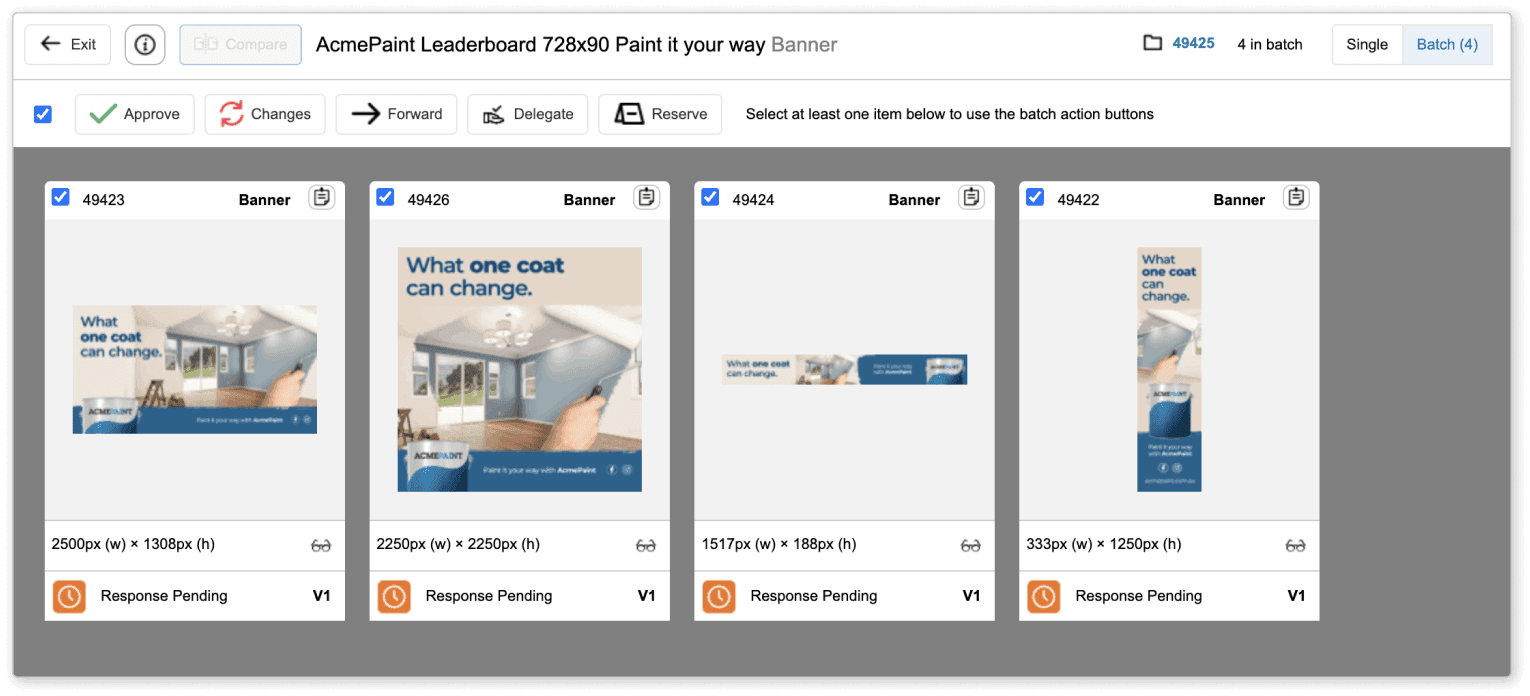
Admation’s Batch Review & Approval feature allows teams to approve groups of marketing assets in a single workflow. It centralises related deliverables into one batch, enabling reviewers to inspect the assets together, apply batch feedback, complete batch checklists and approve everything in one action.
The feature integrates seamlessly with Admation’s Online Proofing, Version Control, Audit Trail and Checklists — delivering a complete, connected approval workflow for marketing teams, creative agencies and compliance reviewers.
Key Features
Batch Review Mode
View all assets in a grouped interface where reviewers can assess multiple deliverables side-by-side, compare variations and ensure consistency across the entire creative set.

Batch Response Tools
Apply comments, markups and revision requests to multiple assets at once, reducing repetitive input and ensuring consistent instructions across similar creative outputs.

Batch Approval Actions
Approve entire batches or selected assets in one action, allowing teams to move high-volume marketing content through the workflow significantly faster.

Batch Forwarding Between Reviewers
Forward grouped assets to the next stakeholder tier — brand, legal, compliance or product teams — with a single click to reduce coordination time.

Batch Compliance Checklists
Complete mandatory compliance, brand and regulatory checklists once for the entire batch, eliminating asset-by-asset duplication during approvals.

Centralised Batch Feedback
All annotations, comments and revision notes are captured within a single consolidated batch view, ensuring clarity and reducing the risk of missed feedback.

Integrated Online Proofing Tools
Use Admation’s markup tools — including shape tools, pens, highlights and text annotations — across all batch assets for clear, consistent visual feedback.

Automatic Asset Grouping
Admation identifies and groups related assets automatically based on campaign, upload or metadata, reducing setup effort for project owners.

Key Benefits
Accelerated Multi-Asset Approvals
Teams fast-track campaign delivery by approving multiple assets together, eliminating the slow, repetitive workflow of reviewing one asset at a time.
Higher Consistency Across Campaigns
Viewing assets side-by-side ensures consistent messaging, branding, regulatory claims and visual alignment across all deliverables.
Reduced Repetitive Effort
Shared feedback only needs to be written once. Reviewers and designers avoid duplicating comments — dramatically reducing revision cycles.
Improved Compliance Accuracy
Batch checklists ensure all assets meet the same legal, brand and regulatory standards, reducing compliance risk across large campaigns.
Stronger Cross-Team Collaboration
Stakeholders gain shared visibility of the full asset group, reducing miscommunication and keeping all reviewer comments unified.
Greater Reviewer Efficiency
Batch workflows reduce fatigue and cognitive load by removing the need to repeatedly open and annotate individual assets.
Optimised Creative Production
Design teams receive clearer, more consistent instruction sets, improving QA, lowering revision counts and speeding delivery.
Better Campaign Cohesion
Reviewing multiple assets together helps maintain message consistency and brand alignment across multi-channel campaigns.
How It Works
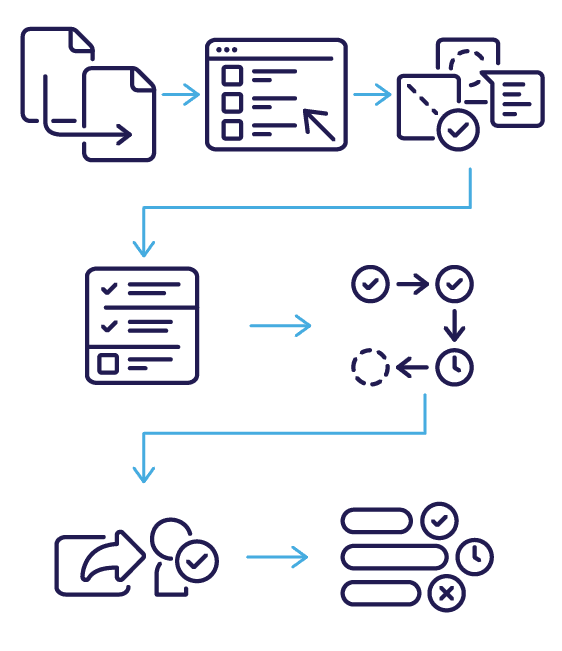
- Group Assets into a Batch
Admation automatically groups related assets based on campaign, upload or metadata, creating a structured batch ready for review. - Review Assets Together or Individually
Stakeholders open the batch and view assets side-by-side or individually, ensuring full visibility across variations and channels. - Apply Batch-Level Markups and Comments
Reviewers annotate multiple assets at once using the built-in proofing tools, applying shared or individual comments as needed. - Complete Batch Compliance Checklists
Mandatory brand, regulatory or legal checklists can be completed once for the full batch, eliminating repetitive asset-by-asset checking. - Approve All or Selected Assets
Reviewers approve the entire batch or choose specific assets to approve, request changes or move forward in the workflow. - Forward the Batch to the Next Reviewers
With one action, the whole batch can be forwarded to the next stakeholder group — such as brand, compliance, product or legal teams. - Track Progress in Real Time
Teams monitor who has approved, who is outstanding and where bottlenecks are forming — with full visibility across the batch approval process.
Use Cases
Marketing Teams
Review and approve high-volume campaign assets faster — ideal for social, digital, print and multi-channel rollouts.

Creative Agencies
Streamline internal reviews across large asset sets and reduce duplicated feedback for client work.

Retail & E-Commerce
Approve large batches of product images, price tickets and promotional content in one step.

Compliance & Legal
Validate claims, disclaimers and mandatory elements consistently across all assets in highly regulated industries.

Enterprise Teams
Support brand, regional and multi-department approval processes for campaigns with dozens or hundreds of deliverables.

Challenges Batch Review & Approval Solve
Repetitive Reviews
Teams waste time reviewing nearly identical assets individually, duplicating feedback and slowing progress across large or fast-moving campaigns.
Feedback Variability
Comments differ when assets are reviewed in isolation, causing inconsistencies that increase rework and reduce campaign cohesion.
Campaign Inconsistencies
Brand, legal or compliance discrepancies are harder to detect when assets are not viewed together in a grouped, comparative workflow.
Peak Bottlenecks
During seasonal promotions or product launches, manual asset-by-asset approvals overwhelm reviewers and delay campaign delivery.
Channel Misalignment
Teams struggle to keep messaging, claims and branding consistent across email, social, display, print and retail placements when reviewed separately.
Duplicated Comments
Reviewers repeat similar instructions across multiple assets, increasing fatigue and raising the likelihood of missing or incomplete feedback.
Compliance Variance
Regulated content needs uniform checking — batch review ensures all variations meet the same compliance and governance requirements.
Messaging Drift
Without batch review, minor copy or design differences emerge across deliverables, diluting message alignment and brand consistency.
Reviewer Fatigue
High-volume manual reviews reduce accuracy, increase oversight risk and lead to slower responses when stakeholders are overloaded.